








RTI Scheduler: The Complete Guide to RTI, MTSS, Flex Time & Student Scheduling
Every school wants tiered intervention to work. Almost none of them find it easy to schedule. Here's how RTI, MTSS, and flex-time blocks actually fit together — and how the right scheduling tool turns a spreadsheet nightmare into a plan your staff can run every single day.
1. What is an RTI Scheduler?
An RTI scheduler is a scheduling system, workflow, or piece of software built specifically to organize tiered intervention time inside a school's master schedule. Rather than treating intervention as an afterthought bolted onto the day, an RTI scheduler treats it as a real subject with its own time block, its own groups, and its own data trail.
In practice, that means the tool helps a school answer four questions every single week: which students need which intervention, which staff member is delivering it, where it happens, and when it happens without colliding with core instruction, electives, or lunch. Tools built for this purpose — including platforms such as RTI Scheduler (UK) and RTI Scheduler (US) — exist because generic timetabling software was never designed to move students between fluid, data-driven groups every few weeks. That is exactly what RTI and MTSS require.
In short: a general timetable answers "where does each class go?" An RTI scheduler answers "where does each student go, based on their current need, right now?" That distinction is the entire reason this category of tool exists.
2. Understanding RTI (Response to Intervention)
Response to Intervention, or RTI, is a framework schools use to identify students who are struggling academically or behaviorally and to give them extra support before they fall too far behind. Instead of waiting for a student to fail a grade or qualify for special education, RTI uses ongoing screening and progress monitoring to catch problems early and match support to need.
RTI is built around three tiers of instruction, each more intensive than the last:
Tier 1 — Core Instruction
High-quality classroom teaching for every student, with universal screening a few times a year to flag anyone falling behind grade-level benchmarks.
Tier 2 — Targeted Support
Small-group instruction, usually 20–30 minutes, several times a week, for students who need more than Tier 1 alone. Progress is checked frequently.
Tier 3 — Intensive Intervention
Individualized or very small-group support for students with the most significant gaps, often daily and closely monitored for growth.
The framework only works if a student can move fluidly between tiers as their data changes — up when they're not progressing, down when they've caught up. That fluidity is precisely where scheduling tends to break down, because most master schedules are built once a year and rarely designed to flex every few weeks.
3. What is MTSS, and how does it relate to RTI?
MTSS stands for Multi-Tiered System of Supports. It uses the same tiered structure as RTI — core instruction, targeted support, intensive intervention — but widens the lens beyond academics to include behavior, attendance, social-emotional wellbeing, and sometimes enrichment for students who are ahead rather than behind.
Many educators use the terms interchangeably, and that's understandable, since MTSS essentially grew out of RTI and shares its tiered, data-driven logic. The cleanest way to think about it: RTI is usually the academic engine, and MTSS is the whole-child framework that RTI now sits inside at most districts.
4. RTI vs. MTSS: the key differences
| Aspect | RTI | MTSS |
|---|---|---|
| Primary focus | Academic skills (reading, math) | Academic, behavioral, social-emotional, attendance |
| Scope | Often classroom or grade-level | Whole-school or district-wide system |
| Data used | Screening & progress-monitoring scores | Academic data plus behavior referrals, attendance, wellbeing indicators |
| Who's served | Students below benchmark | Every student, including those needing enrichment |
| Scheduling need | Flexible small-group intervention blocks | Flexible blocks for academics and behavior/SEL groups |
Both frameworks lean on the same daily requirement: a protected, flexible block of time in the schedule where students can be regrouped based on current data — which is exactly what a good RTI scheduler and MTSS-ready platform is designed to manage.
5. What is flex time, and why does it matter?
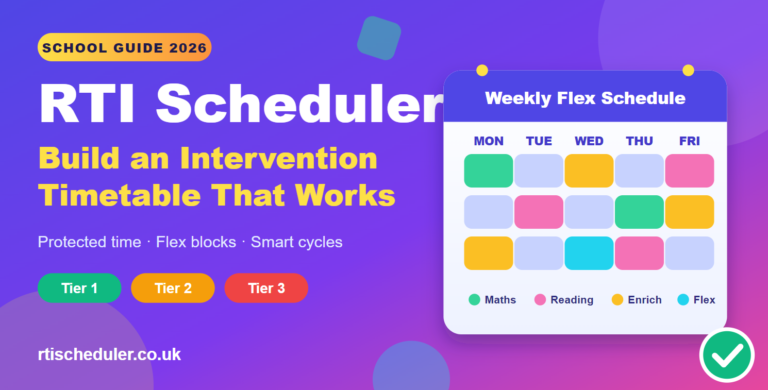
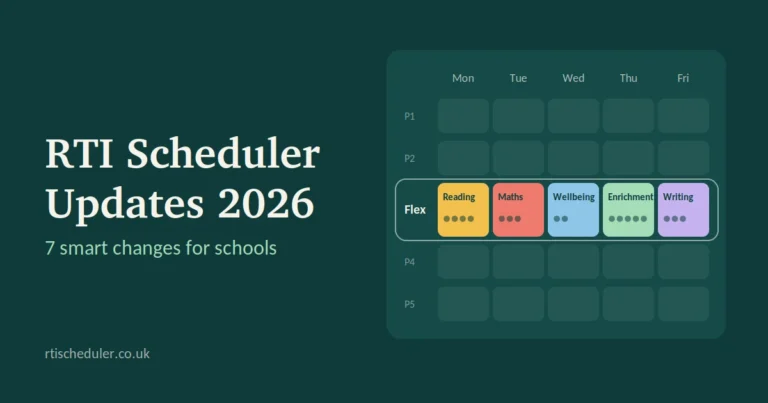
Flex time — sometimes called WIN time ("What I Need"), enrichment block, advisory-plus, or intervention period — is a dedicated stretch of the school day, typically 30 to 45 minutes, set aside for something other than fixed, whole-class instruction. During flex time, students are grouped and regrouped based on current need: some go to a reading intervention group, some join a math re-teach session, some attend an enrichment club, and some meet with a counselor.
Flex time matters because it is the engine room of RTI and MTSS. Without it, intervention gets squeezed into recess, pulled from an elective, or dropped entirely when the schedule gets tight. With a well-run flex block, every student has somewhere purposeful to be, every day, based on what the data says they need this week — not what they needed in September.
Why schools struggle here: flex time only works if students can be reshuffled quickly and accurately. Doing that by hand, across hundreds of students and dozens of staff, in a spreadsheet, is where most flex-time efforts quietly collapse under their own weight.
6. Common student scheduling challenges
Ask any assistant principal who owns the master schedule, and you'll hear a version of the same list:
- Student groups change every few weeks as progress-monitoring data comes in, but the schedule was built once, in August.
- A single student may need reading intervention and a behavior check-in and speech services — all in the same 30-minute window.
- Staff availability, caseloads, and certifications (who is qualified to deliver a specific intervention) have to be respected without creating impossible overlaps.
- Interventions can't pull students out of the same core class every time, or they miss the same content repeatedly.
- Multiple spreadsheets, sticky notes, and hallway conversations replace a single source of truth, so no one — including the student's own teacher — is fully sure where a child is supposed to be.
- Reporting for administrators, coaches, and compliance reviews has to be pulled together manually after the fact.
None of these problems are really about intervention content. They're about logistics — and logistics at this scale is a job for software, not a spreadsheet.
7. How RTI scheduling software solves these problems
Purpose-built RTI scheduling software takes the constraints above — student needs, staff availability, room capacity, group size limits, and "don't pull from the same class twice" rules — and solves them the way a good timetabling engine solves a master schedule: automatically, and in seconds rather than days.
Instead of a coordinator manually re-sorting 400 students into new groups every progress-monitoring cycle, the system re-runs the placement based on updated scores, flags any conflicts, and produces a schedule that respects every constraint at once. Platforms like RTI Scheduler are built around exactly this workflow — importing screening data, generating flex-time groupings, and giving every teacher a clear, printable or digital view of who belongs where.
8. Key features to look for in RTI scheduling software
- Automated, constraint-based grouping — regroups students in minutes when new data lands, honoring staff certifications and caseload limits.
- Data import from your assessment tools — pulls screening and progress-monitoring scores directly rather than requiring manual re-entry.
- Conflict detection — flags double-bookings, missed core content, or over-capacity rooms before the schedule goes live.
- Teacher-facing views — a simple, printable or app-based roster so staff always know who's in front of them and why.
- Progress tracking over time — so movement between tiers is documented, not just remembered.
- Reporting for administrators — quick exports for coaching conversations, board reports, or compliance reviews.
- Support for both RTI and MTSS structures — since most schools eventually need behavior and SEL groups alongside academic ones.
9. Step-by-step: implementing an RTI/MTSS schedule
-
Protect the time on the master schedule first
Before anything else, block a consistent, school-wide flex period every day. If it isn't protected on the master schedule, it will eventually get squeezed out.
-
Collect and centralize your screening data
Bring universal screening and progress-monitoring results into one place so grouping decisions are based on current numbers, not last semester's memory.
-
Define your tiers and group sizes
Decide how Tier 1, 2, and 3 will look in practice — group size caps, session length, and how often groups are reviewed.
-
Map staff availability and qualifications
Note which staff can deliver which interventions, and their scheduled availability during the flex block.
-
Generate the schedule
Use an RTI scheduler to auto-place students into groups against all of the above constraints, rather than assembling it by hand.
-
Review, adjust, and publish
Check for edge cases — siblings needing separate groups, students with multiple service needs — then share rosters with staff.
-
Monitor and re-run on a cycle
Re-screen every 4–6 weeks and let the scheduler regenerate groups, so movement between tiers actually happens instead of staying static all year.
10. Best practices for flex-time scheduling
- Keep the flex block at the same time every day so it becomes routine for students and staff.
- Avoid pulling the same students out of the same core subject repeatedly — rotate which period intervention overlaps with, if a pull-out model is used.
- Cap group sizes realistically for Tier 2 and Tier 3 rather than letting them grow past what one adult can effectively manage.
- Give every teacher a single, current source of truth for where each student belongs — not a schedule that's a week out of date.
- Re-run groupings on a fixed, predictable cycle so the whole staff knows when and why rosters will change.
- Include enrichment groups, not just remediation, so flex time supports every student, in the spirit of MTSS.
11. Benefits for teachers, students, and administrators
For teachers, a well-run RTI scheduler means walking into flex time with a clear, accurate roster instead of a guess — and confidence that the students in the room are actually the ones who need that specific support right now.
For students, it means intervention that matches their current, real level rather than a placement made months ago. A student who's caught up moves out of intensive support quickly; a student who's slipping gets flagged and regrouped just as fast.
For administrators, it means a defensible, documented record of who received what support and when — useful for staff coaching, parent conversations, and any compliance or audit process — without a team spending hours rebuilding spreadsheets every cycle.
See it running in your own building
If your school is still managing RTI or MTSS groups through spreadsheets and sticky notes, it's worth seeing what a purpose-built scheduler looks like in practice.
Explore RTI Scheduler (UK) → Explore RTI Scheduler (US) →12. Frequently asked questions
What is the difference between RTI and MTSS?
RTI is generally focused on academic tiered intervention, most often reading and math. MTSS uses the same tiered structure but expands it to include behavior, attendance, and social-emotional support across the whole school. Many districts now use MTSS as the umbrella term that includes RTI.
How long should a flex-time block be?
Most schools use 30 to 45 minutes. Shorter blocks struggle to fit a meaningful small-group session; much longer, and it becomes difficult to protect the time from being repurposed elsewhere in the day.
How often should intervention groups be re-evaluated?
A common cycle is every four to six weeks, tied to progress-monitoring data. Some Tier 3 groups are checked weekly given how intensive that level of support is.
Can one student be in more than one intervention group?
Yes, and it's common — a student might need both reading support and a behavior check-in. Good scheduling software is built to handle overlapping needs without creating time conflicts.
Do small schools need dedicated RTI scheduling software?
Even small schools benefit once group sizes and staff numbers reach the point where manual regrouping becomes error-prone. Many smaller schools start with a lightweight tool and grow into a fuller platform as their MTSS program matures.
Is flex time the same as an advisory period?
Not quite. Advisory periods are often fixed, relationship-focused blocks with the same group all year. Flex time is intentionally fluid — students move between groups as their data changes, which is what makes it suited to RTI and MTSS.
Bringing it all together
RTI and MTSS give schools a proven, tiered framework for catching students early and giving them exactly the support they need. Flex time is the daily engine that makes that framework real. The piece that's historically been missing is a way to schedule all of it without a coordinator losing an entire weekend to spreadsheets every time new data comes in.
That's the gap a dedicated RTI scheduler is built to close — turning screening data into a runnable, conflict-free schedule that updates as often as your students' needs do. If you're ready to see what that looks like for your own school, both rtischeduler.co.uk and rtischeduler.com are good places to start.
Frequently Asked Questions
Quick answers to common questions
What Our Users Say
Real feedback from real customers
"RTI Scheduler has saved our team hundreds of hours. No more email ping‑pong!"
"Our no‑show rate dropped by 40% within the first month."
"The integration with our ATS was seamless. Highly recommend!"
Ready for Smart Interviews?
Join 466+ schools and enterprises using RTI Scheduler to save thousands of hours annually.
🔥 Start Free Trial