To better understand the platform’s capabilities, explore the RTI Scheduler Features page. Schools are increasingly using digital tools to simplify student support and intervention programs. One of the most effective platforms available today is RTI Scheduler. Designed to help schools manage Response to Intervention (RTI), enrichment periods, WIN blocks, and student support sessions, RTI Scheduler provides an organized system for both teachers and students.
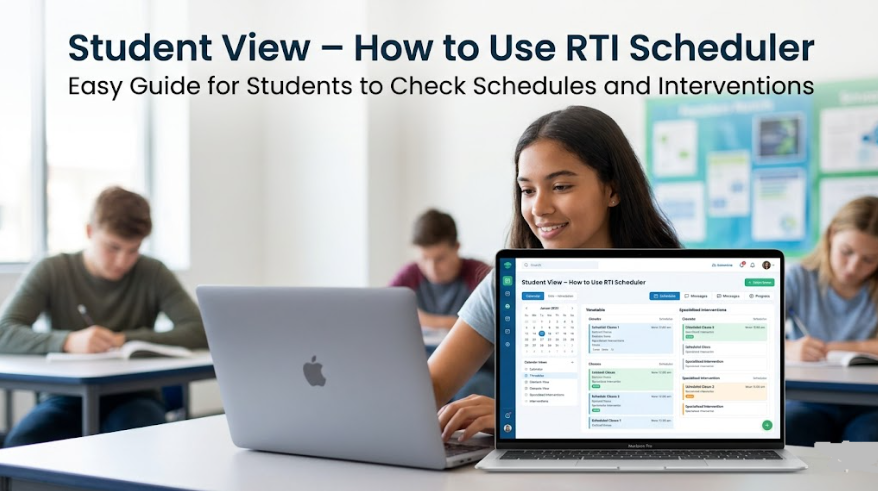
For students, understanding how to navigate the platform is essential. The student view allows learners to check schedules, see assigned interventions, and stay informed about upcoming sessions.
To help students better understand the platform, watch the instructional video below:
This guide explains everything students need to know about using RTI Scheduler effectively.
What Is RTI Scheduler?
RTI Scheduler is a school scheduling platform designed to streamline intervention and enrichment programs. It helps educators place students into appropriate instructional groups while ensuring schedules remain organized and conflict-free.
The system supports:
- Response to Intervention (RTI) programs
- Multi-Tiered System of Supports (MTSS)
- WIN (What I Need) periods
- Enrichment activities
- Academic intervention groups
- Student support sessions
Students can easily access their assigned schedules through the student portal, making it simple to know where they need to be during intervention periods.
Understanding the Student View
The student view in RTI Scheduler is designed to be straightforward and user-friendly. Instead of navigating complicated menus, students can quickly see their intervention schedule and assigned sessions.
Typical information available in the student dashboard includes:
Assigned Intervention Groups
Students can view which intervention group they have been assigned to during a specific RTI block.
Examples may include:
- Reading intervention
- Math support
- Enrichment programs
- Study skills sessions
- Academic coaching
Teacher Assignments
The platform displays the teacher responsible for each scheduled session. This helps students know where to report and who will be leading the intervention.
Session Times
Students can see:
- Session start times
- Session end times
- Intervention periods
- Daily schedules
This reduces confusion and improves attendance.
How Students Access RTI Scheduler
Most schools provide access through:
- School-issued login credentials
- Student portal integrations
- Single Sign-On (SSO) systems
- School district dashboards
After logging in, students can navigate directly to their assigned intervention schedule.
Depending on the school’s setup, access may be available on:
- Desktop computers
- Laptops
- Chromebooks
- Tablets
- Mobile devices
Checking Your Daily Schedule
One of the most important features of RTI Scheduler is the ability to review your daily schedule.
Students should check their schedule regularly because intervention assignments can change based on:
- Academic progress
- Assessment results
- Teacher recommendations
- Scheduling updates
A quick daily review helps ensure students arrive at the correct location and are prepared for the session.
Viewing Intervention Details
When students open a scheduled intervention block, they may see additional information such as:
- Teacher name
- Room location
- Session title
- Program type
- Notes from educators
This information helps students understand the purpose of the session and what materials they may need.
Benefits of Using RTI Scheduler for Students
Better Organization
Students no longer need to remember changing intervention schedules manually. Everything is stored in one convenient location.
Improved Attendance
Clear schedules reduce missed sessions and help students arrive on time.
Increased Accountability
Students can take ownership of their learning by regularly checking assignments and intervention placements.
Easier Communication
Because assignments are visible within the system, students have a better understanding of expectations and upcoming support opportunities.
Many schools also implement RTI Scheduler within a Multi-Tiered System of Supports (MTSS) framework to improve student success and intervention effectiveness.
Tips for Students Using RTI Scheduler
To get the most value from the platform, students should follow several best practices.
Check the Schedule Frequently
Intervention groups may change throughout the year. Reviewing schedules regularly ensures students always know where they need to be.
Arrive Prepared
Bring required materials such as:
- Notebooks
- Chromebooks
- Pencils
- Class assignments
- Reading materials
Follow Teacher Instructions
Each intervention session is designed to provide targeted support. Active participation helps students benefit from the program.
Ask Questions
If there is confusion regarding schedules or assignments, students should contact their teacher or school administrator for clarification.
Common Student Questions
Can Students Change Their Own Assignments?
In most schools, intervention assignments are managed by teachers and administrators. Students typically cannot move themselves between groups.
What Happens if a Schedule Changes?
The system updates automatically when administrators make changes. Students should regularly review their dashboard for updates.
Can RTI Scheduler Be Accessed from Home?
Many schools allow remote access, enabling students to check schedules outside school hours. Availability depends on district settings and permissions.
Is RTI Scheduler Only for Intervention Programs?
No. Many schools also use the platform for enrichment activities, advisory periods, WIN blocks, and other student support programs.
Why Schools Use RTI Scheduler
Schools choose RTI Scheduler because it helps create structured intervention programs while reducing scheduling conflicts.
Benefits for schools include:
- Efficient student grouping
- Improved intervention management
- Better reporting capabilities
- Increased instructional time
- Simplified schedule adjustments
Students benefit from a more organized experience that supports academic growth and achievement.
Final Thoughts
Understanding the Student View – How to Use RTI Scheduler is an important step toward making the most of intervention and enrichment opportunities. The platform provides students with a clear overview of schedules, teacher assignments, and intervention sessions, helping them stay organized and focused on their educational goals.
By regularly checking schedules, attending assigned sessions, and participating actively, students can maximize the benefits offered through RTI Scheduler. Whether your school uses RTI, MTSS, WIN periods, or enrichment programs, RTI Scheduler serves as a valuable tool for keeping students connected to the support they need.
Video Reference: Student View – How to Use RTI Scheduler by Principal Dominguez.